

What is MegunoLink?
MegunoLink helps you make your Arduino projects work. Use it to plot measurements from sensors, send commands to control your Arduino or tabulate data.
MegunoLink provides an easy way to interact with your Arduino project.
Join our free newsletter for great tips and tricks to help you get more from your Arduino projects with MegunoLink.
MegunoLink connects to your Arduino
You can connect MegunoLink to any Arduino device. Whether you are using a core Arduino board such as the Uno and Mega, have branched out to a 3rd party device like the ESP32 or Artemis, or built your own board: MegunoLink is good to go.
Use the Connection Manager visualizer to create a connection to your Arduino with:
- Serial/USB (baud rates from 300 to 921,600),
- TCP client or server,
- UDP, or
- XBee Series 2 Pro, and more.
You can create connections to many devices at the same time. Or many connections to one device: mix serial and wireless to conquer debugging and communications.
MegunoLink also supports multicast DNS (mDNS). Multicast DNS makes it easier to find your wireless masterpiece without guessing its IP address.

Create and configure serial, UDP, file and XBee connections with the Connection Manager
Plotting with MegunoLink
After Installing our MegunoLink library for Arduino, plotting is easy:
|
1 2 3 4 5 6 7 8 9 10 11 12 13 14 15 16 17 18 |
#include "CommandHandler.h" void setup() { Serial.begin(9600); } void loop() { // Create a plot variable TimePlot MyPlot; // Send a measurement from the first analog channel MyPlot.SendData("Sensor", analogRead(0)); // Wait a little while before making the next measurement delay(500); } |
You have control of all graph properties. From MegunoLink or your Arduino sketch, set the:
- Graph title,
- X-axis title,
- Y-axis title (left and right),
- Series name,
- Series colors, line-styles, marker symbols and more.
Use multiple graphs for different data, several axes for measurements on different scales or just put all your data on one plot. Zoom in to take a closer look or export the data to a spreadsheet.
Watch your data come to life with MegunoLink, whether it is travelling by serial cable, wireless ether or carrier pigeon (coming soonish).
Check out Getting started with plotting data to make your first plot.


Take Command of your Arduino
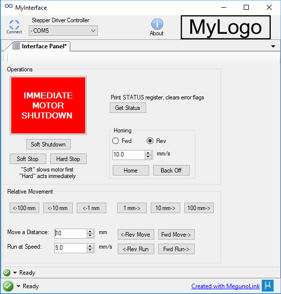
Build a custom user interface with our Interface Panel visualizer. Just drag and drop controls then give them commands using the Interface Panel Designer.
Commands are sent to your Arduino as you interact with controls:
- click buttons,
- drag track bars, or
- type in a text box.
They’ll go wirelessly or by cable. However you connect.
And the command handler in our MegunoLink library for Arduino makes processing those commands in your Arduino code a breeze. Well, actually a couple of lines of code…
|
1 2 3 4 5 6 7 8 9 10 11 12 13 14 15 16 17 18 19 20 21 22 23 |
#include “CommandHandler.h” CommandHandler<> Cmds; // Function called when Doit command is received void Cmd_MyCommand(CommandParameters &p) { Serial.println(F(”Your will is my command”)); } void setup() { Serial.begin(9600); // Register commands Cmds.AddCommand(F(”Doit”), Cmd_MyCommand); } void loop() { // Process and dispatch commands Cmds.Process(); } |

Commands call functions in your Arduino program. They can get parameters from the command and do anything you want, from turning on an LED to launching a spaceship (spaceship sold separately).
Learn more:
Good to go
MegunoLink projects can be packaged into a stand-alone application using Builder (sold separately).
Builder creates a custom installer that bundles core MegunoLink functionality with your MegunoLink project. Add branding and distribute your project to the world.
What’s next?
Install our Arduino integration tools so:
- the MegunoLink library for Arduino is available to your sketches, and
- MegunoLink automatically disconnects serial ports when you upload your Arduino program to your device.
Subscribe to our newsletter for great tips and tricks that will help you get more from your Arduino projects with MegunoLink.
Check out our:
-
- Getting started guides for MegunoLink walk-throughs,
- Arduino examples page for inspiration,
- friendly community forum to talk about your projects or ask for help,
- super support team if you get stuck, have questions or suggestions.
It is time to start tinkering!

MegunoLink has been downloaded by more than 40,000 engineers and makers.
Check out some of the cool stuff they have been building…
Prototype Reflow Oven
by Scott Swaaley


Love this software. Just built a GUI for my DIY reflow oven.
Wireless VA Meter
by George Kontopidis


I have been enjoying the MegunoLink — excellent code and superb documentation.
Ion Thruster
by Michael Bretti (Applied Ion Systems)


I just ran my first official full system test yesterday after a year of preparation. Everything worked fantastic and MegunoLink performed amazingly.

